

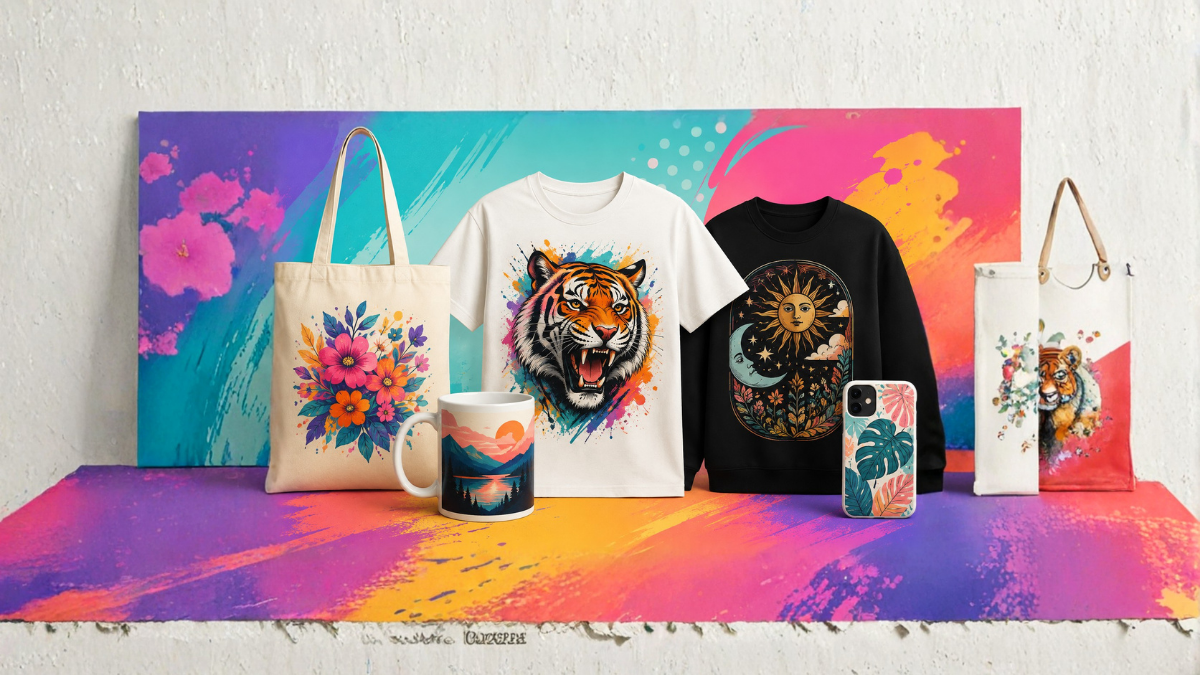
Print-on-demand has made it easier than ever to start an online design business without keeping inventory or handling shipping yourself. However, creating attractive and original designs consistently can still be challenging, especially if you are not an experienced graphic designer.
This is where Kittl AI can be useful.
Kittl is an online design platform that combines traditional graphic design tools with AI-powered features. It can help you generate ideas, create graphics, experiment with typography, remove backgrounds, and build designs suitable for products such as T-shirts, hoodies, mugs, posters, tote bags, stickers, and more.
In this guide, you will learn how to use Kittl AI for print-on-demand designs, from finding an idea to creating a finished design that can be prepared for a print-on-demand marketplace.
What Is Kittl AI?
Kittl is a browser-based graphic design platform designed to make professional-looking designs easier to create. It provides templates, fonts, illustrations, text effects, mockups, image editing tools, and AI-powered design features.
Kittl AI can be particularly helpful for print-on-demand because it allows creators to turn simple ideas into visual concepts without starting everything from a blank canvas.
For example, you could start with an idea such as:
- Funny camping quote
- Vintage coffee design
- Retro motorcycle artwork
- Cute pet illustration
- Motivational gym design
- Halloween-themed typography
- Minimalist travel artwork
You can then develop the concept into a complete product design using Kittl’s design tools.
The biggest advantage is speed. Instead of spending hours creating every element manually, you can use AI and Kittl’s existing design resources to speed up the creative process.
Why Use Kittl AI for Print-on-Demand?
Print-on-demand businesses often require a large number of designs. If you want to sell products across different niches, manually creating every design can take considerable time.
Kittl AI can help with several parts of the process.
1. Faster Idea Generation
Coming up with new design concepts can be one of the hardest parts of print-on-demand. AI can help you explore different visual directions based on an idea.
2. Easier Graphic Creation
You do not necessarily need advanced illustration skills to create a visually appealing design. AI-generated graphics can provide a starting point that you can customize.
3. Professional Typography
Typography is extremely important in print-on-demand. Kittl provides numerous fonts and text effects that can help you create vintage, retro, modern, decorative, or bold typography.
4. Quick Design Variations
You can experiment with different fonts, layouts, colors, illustrations, and compositions to create multiple versions of a concept.
5. Product Mockups
Mockups can help you see how a design may look on products such as T-shirts, hoodies, posters, and other merchandise before publishing it.
Step 1: Choose a Print-on-Demand Niche
Before opening Kittl, decide what type of audience you want to target.
A specific niche is usually easier to build around than a completely general store. Some examples include:
- Fitness
- Camping
- Gardening
- Fishing
- Cooking
- Pets
- Travel
- Coffee lovers
- Teachers
- Nurses
- Gamers
- Car enthusiasts
- Motorcycle enthusiasts
- Book lovers
- Family-themed products
Instead of creating a generic shirt that says “Be Happy,” you could create a more targeted concept such as a humorous quote aimed at camping enthusiasts.
The more clearly you understand your audience, the easier it becomes to create designs that appeal to them.
Step 2: Research Your Design Idea
After selecting a niche, research the type of products customers are interested in.
Look at popular print-on-demand marketplaces and study common design styles, but do not copy existing artwork.
Pay attention to:
- Popular themes
- Typography styles
- Color combinations
- Product types
- Seasonal trends
- Common customer interests
- Humor styles
- Illustration styles
Your goal should be to identify opportunities rather than duplicate successful designs.
For example, if you notice that retro typography is popular among coffee enthusiasts, you can create your own original coffee-themed concept using a different phrase, composition, and artwork.
Step 3: Open Kittl and Start a New Design
Once you have your concept, open Kittl and create a new project.
Choose an appropriate canvas size based on the product you want to create.
For a T-shirt design, you will generally want a large, high-quality canvas that provides enough resolution for printing.
Before exporting your final artwork, check the requirements of your chosen print-on-demand provider. Different platforms may have different requirements for dimensions, file formats, transparency, and resolution.
Step 4: Use Kittl AI to Generate a Design Concept
Now you can start experimenting with Kittl’s AI-powered tools.
The quality of your result can depend heavily on how clearly you describe what you want.
Instead of using a very short prompt such as:
“Camping design”
try describing the subject, style, composition, and intended use.
For example:
“Vintage camping illustration featuring a mountain landscape, pine trees, a campfire and a classic outdoor badge style, bold retro colors, screen-print aesthetic, clean composition.”
This gives the AI more information about the visual direction.
You can experiment with different descriptions until you find a concept that fits your product.
Step 5: Create Original Typography
Text-based designs are extremely popular in print-on-demand.
Kittl’s typography tools can help you create distinctive text compositions.
Suppose you are designing a coffee-themed shirt with the phrase:
“Coffee First, Adventure Later”
Instead of placing the sentence in a basic font, you can experiment with:
- Curved text
- Arched typography
- Vintage fonts
- Bold lettering
- Decorative text
- Text outlines
- Shadows
- Distressed effects
- Layered typography
The goal is to make the words feel like part of the artwork rather than simply adding text to a blank shirt.
Step 6: Combine AI Graphics With Typography
One of the most effective approaches is to combine an AI-generated illustration with manually designed typography.
For example, imagine creating a fishing T-shirt.
You could use an AI-generated fish or fishing-related illustration as the central graphic and then create a bold vintage phrase around it.
The final layout could include:
Top: “Born to Fish”
Center: Fishing illustration
Bottom: “Forced to Work”
This combination can create a stronger visual hierarchy than using either text or an illustration alone.
Step 7: Customize the AI-Generated Design
Do not assume that the first AI-generated result is your finished product.
AI should generally be treated as a creative starting point.
After generating an image, inspect it carefully.
Look for:
- Unwanted objects
- Strange shapes
- Incorrect details
- Awkward composition
- Unnecessary elements
- Poor spacing
- Difficult-to-read text
- Elements that may not print well
Then use Kittl’s editing tools to improve the design.
You can resize elements, change colors, remove backgrounds, adjust typography, move objects, and modify the overall composition.
This editing stage can make the difference between a generic AI image and a polished print-on-demand design.
Step 8: Choose the Right Color Combination
Color plays a major role in merchandise design.
A design that looks good on a white background may not work well on a black T-shirt.
For example, a vintage design may work well with muted colors such as cream, brown, orange, and dark green.
A modern motivational design might benefit from a simpler combination with strong contrast.
When designing for print-on-demand, always consider the color of the product on which the design will appear.
You may want to create separate versions for:
- Black
- White
- Navy
- Gray
- Beige
- Dark green
- Other popular product colors
Avoid using too many colors unless they are necessary for the design.
Step 9: Remove the Background When Necessary
Many T-shirt designs work best with a transparent background.
If your artwork has a solid background, you may need to remove it before exporting.
A transparent background allows the product’s fabric color to become the background of the design.
For example, an illustration designed for a black shirt may look much better when only the artwork is printed rather than placing it inside a large white rectangle.
Check the export options available in your Kittl plan and ensure that your chosen print-on-demand platform supports the file format you intend to upload.
Step 10: Check the Design at Full Size
Before publishing your design, zoom in and inspect the details.
Small problems that are difficult to notice while designing can become obvious when the artwork is printed.
Check:
- Spelling
- Grammar
- Alignment
- Text readability
- Image quality
- Spacing
- Background transparency
- Small graphic details
- Overall balance
This is particularly important for AI-assisted designs because AI-generated visuals can sometimes contain unexpected details.
Step 11: Create a Product Mockup
Kittl’s mockup tools can help you visualize how your artwork may look on an actual product.
For example, you can preview your design on a T-shirt or other merchandise.
Mockups are useful for two reasons.
First, they help you identify design problems.
A design that looks excellent on the editing canvas may look too small or too crowded when placed on a T-shirt.
Second, mockups can be used to create promotional images for your online store, depending on the licensing and usage rights applicable to the assets you use.
Step 12: Prepare the Design for Print-on-Demand
Once the design is finished, prepare the file according to the specifications of your print-on-demand provider.
Common considerations include:
- Correct dimensions
- Sufficient resolution
- Appropriate file format
- Transparent background when required
- Proper color settings
- No unnecessary background elements
- Correct placement
Do not automatically use the same file for every product. A design created for a T-shirt may need different dimensions or positioning for a mug, poster, phone case, or tote bag.
Always check the current specifications of the marketplace or printing company you plan to use.
Step 13: Upload Your Design
After exporting the artwork, upload it to your preferred print-on-demand platform.
Add the design to the appropriate product and check the preview carefully.
Look at the product from the customer’s perspective.
Ask yourself:
“Would I understand what this product is about immediately?”
“Is the text easy to read?”
“Does the artwork look professional?”
“Does the design fit the product?”
“If I saw this among hundreds of products, would it catch my attention?”
These questions can help you identify designs that need improvement before publishing.
Step 14: Create Multiple Design Variations
One idea can often become several products.
For example, a camping concept could be converted into:
- A vintage camping shirt
- A minimalist camping shirt
- A funny camping shirt
- A camping mug
- A camping poster
- A camping sticker
You can also experiment with different typography, colors, illustrations, and layouts.
However, avoid creating nearly identical products simply to increase the number of listings. Each design should offer something useful or visually different to customers.
Tips for Better Kittl AI Print-on-Demand Designs
Keep Your Designs Simple
Simple designs can often work better on merchandise because they are easy to understand from a distance.
Do not fill the entire canvas with unnecessary elements.
Focus on One Main Idea
A strong design usually communicates one clear concept.
For example, a humorous fishing shirt should have a clear fishing-related message rather than combining unrelated themes.
Make Typography Readable
Fancy fonts can look attractive, but readability should come first.
If customers cannot understand the message quickly, the design may not perform well.
Use AI as an Assistant
AI can help generate ideas and visual assets, but human editing is still important.
Review every AI-generated result and make appropriate changes.
Create Designs for Specific Audiences
A design made for “everyone” can easily become too generic.
A design made specifically for dog moms, mountain bikers, teachers, or coffee lovers can communicate more directly with its intended audience.
Think About the Product
A T-shirt, mug, poster, sticker, and tote bag have different design requirements.
Consider the shape, printable area, viewing distance, and typical use of each product.
Avoid Copyright and Trademark Problems
One of the most important considerations when using AI for print-on-demand is intellectual property.
Do not create designs that copy copyrighted artwork or use trademarks without permission.
Be particularly careful with:
- Famous characters
- Movie titles
- Sports team logos
- Company logos
- Celebrity images
- Brand names
- Protected slogans
- Existing artwork
For example, simply changing the color of another person’s artwork does not make it your original work.
Before publishing a design commercially, make sure you have the necessary rights to use every element.
Also review the current licensing terms of Kittl and your print-on-demand provider, especially when using AI-generated content, templates, fonts, illustrations, stock assets, or other platform resources.
Common Mistakes to Avoid
Beginners often make several mistakes when creating AI-powered print-on-demand designs.
One common mistake is publishing the first AI-generated image without editing it.
Another is using extremely detailed artwork that does not print clearly at the intended size.
Other mistakes include:
- Using unreadable fonts
- Copying popular designs
- Ignoring trademarks
- Using low-quality images
- Creating overcrowded layouts
- Forgetting transparent backgrounds
- Not checking the final product preview
- Targeting an overly broad audience
- Uploading designs without researching the niche
Taking extra time during the editing and quality-control stage can significantly improve the professionalism of your products.
Can Kittl AI Help You Build a Print-on-Demand Business?
Yes, Kittl can be a useful part of a print-on-demand workflow, particularly for creators who want to produce designs faster.
However, a successful print-on-demand business involves more than graphic design.
You also need to consider:
- Niche research
- Product selection
- Pricing
- Keywords
- Product descriptions
- Store branding
- Marketing
- Customer demand
- Competition
- Intellectual property
- Product quality
Kittl can help with the creative side, but the overall business strategy still matters.
Final Thoughts
Kittl AI can make print-on-demand design creation much easier by combining AI-powered tools with professional design features, typography, templates, illustrations, and mockups.
The best approach is not to rely completely on AI. Instead, use AI to generate ideas and visual starting points, then refine those concepts yourself.
Start with a specific niche, research your audience, create an original concept, generate or develop the artwork, improve the typography, check the design carefully, and test it on the actual product.
With consistent practice, Kittl AI can become a valuable tool in your print-on-demand workflow and help you create more designs in less time.
Frequently Asked Questions
1. What is Kittl AI used for?
Kittl AI can be used to assist with graphic design tasks such as generating visual concepts, creating artwork, developing design ideas, and editing graphics. It can be particularly useful for merchandise, social media graphics, branding, posters, and print-on-demand products.
2. Can I use Kittl AI for print-on-demand?
Yes. Kittl can be used as part of a print-on-demand design workflow. You can create artwork, typography-based designs, illustrations, and product mockups and then prepare suitable files for a print-on-demand service.
3. Is Kittl good for beginners?
Kittl is designed to make graphic design more accessible, so beginners can use its templates, fonts, design elements, and AI-assisted features without having extensive professional design experience.
4. Can Kittl create T-shirt designs?
Yes. Kittl can be used to create T-shirt artwork, including typography designs, illustrations, badges, vintage graphics, and other merchandise concepts.
5. What should I include in a Kittl AI prompt?
A useful prompt can describe the subject, visual style, composition, mood, colors, and intended design purpose. For example, you can specify that you want a vintage camping illustration with mountains, pine trees, bold typography, and a screen-print aesthetic.
6. Can I edit AI-generated designs in Kittl?
Yes. AI-generated artwork can be used as a starting point and then adjusted using Kittl’s design and editing features. You can modify the layout, typography, colors, size, and other design elements.
7. What products can I create with Kittl for print-on-demand?
Depending on your chosen print-on-demand provider, designs can be used for products such as T-shirts, hoodies, mugs, posters, tote bags, stickers, phone cases, and other merchandise.
8. Do Kittl AI designs need editing before selling?
Editing is strongly recommended. AI-generated artwork may contain unwanted details, awkward compositions, or elements that do not work well when printed. Reviewing and improving the design can produce a more professional final product.
9. Can I use Kittl designs commercially?
Commercial usage depends on the specific Kittl plan, asset, feature, and licensing terms that apply to your project. Always review Kittl’s current licensing conditions before using platform assets or AI-generated content for commercial products.
10. How do I make better print-on-demand designs with Kittl AI?
Start with a specific niche and create original concepts. Use clear AI prompts, choose readable typography, maintain a simple composition, check your artwork at full size, and preview the final design on the intended product.
11. Can Kittl AI help generate design ideas?
Yes. AI can be useful for brainstorming visual concepts and exploring different styles. You can use those ideas as starting points and then develop them into original designs.
12. Is Kittl enough to start a print-on-demand business?
Kittl can provide many of the tools needed for the design side of a print-on-demand business, but it is not the entire business strategy. You still need niche research, product selection, marketplace optimization, marketing, pricing, and careful attention to intellectual property rights.
